SMS Program & Opt-In Workflow
About the program
SEOlith LLC sends transactional account-notification text messages to registered business users of its Omnifield platform — for example new-lead alerts, missed-call alerts, replies to support requests, and up/down status alerts for websites the business asks us to monitor. Recipients are the owners and staff of businesses that hold accounts on the platform. These are account notifications, not marketing messages, and message volume is low.
How opt-in works
Opt-in occurs inside the authenticated Omnifield web application. There is no public or keyword-based enrollment, and SMS alerts are off by default for every account. Recipients are staff of the subscribing business; numbers are enrolled either by the recipient directly or by an authorized administrator of that business who has obtained the recipient's consent.
- An authorized business user signs in to the Omnifield app and opens the Alerts settings for their business.
- The user enters the recipient's mobile number in the SMS Recipients field.
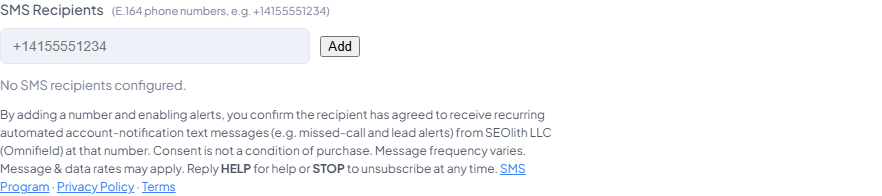
- The consent disclosure shown below is displayed directly at the point of opt-in, before alerts can be enabled.
- The user enables alerts and saves. A consent record — the number, the enrolling user, the change made, and its timestamp — is written to the platform's append-only audit log.
- The first message sent to a newly enrolled number is an opt-in confirmation SMS that repeats message frequency, message & data rates, HELP, and STOP.
Phone numbers are never purchased, rented, scraped, or shared. No mobile information is shared with third parties or affiliates for marketing or promotional purposes.
Disclosure shown at the point of opt-in
The opt-in screen
The SMS Recipients section of the Alerts settings in the Omnifield app, where opt-in takes place — captured from the live production application:
Program messages
Opting out & help
- Reply STOP to any message to unsubscribe at any time.
- Reply HELP to any message, or contact [email protected], for assistance.
- SMS alerts can also be disabled at any time in the app's Alerts settings.
Contact
SEOlith LLC — [email protected] or [email protected].